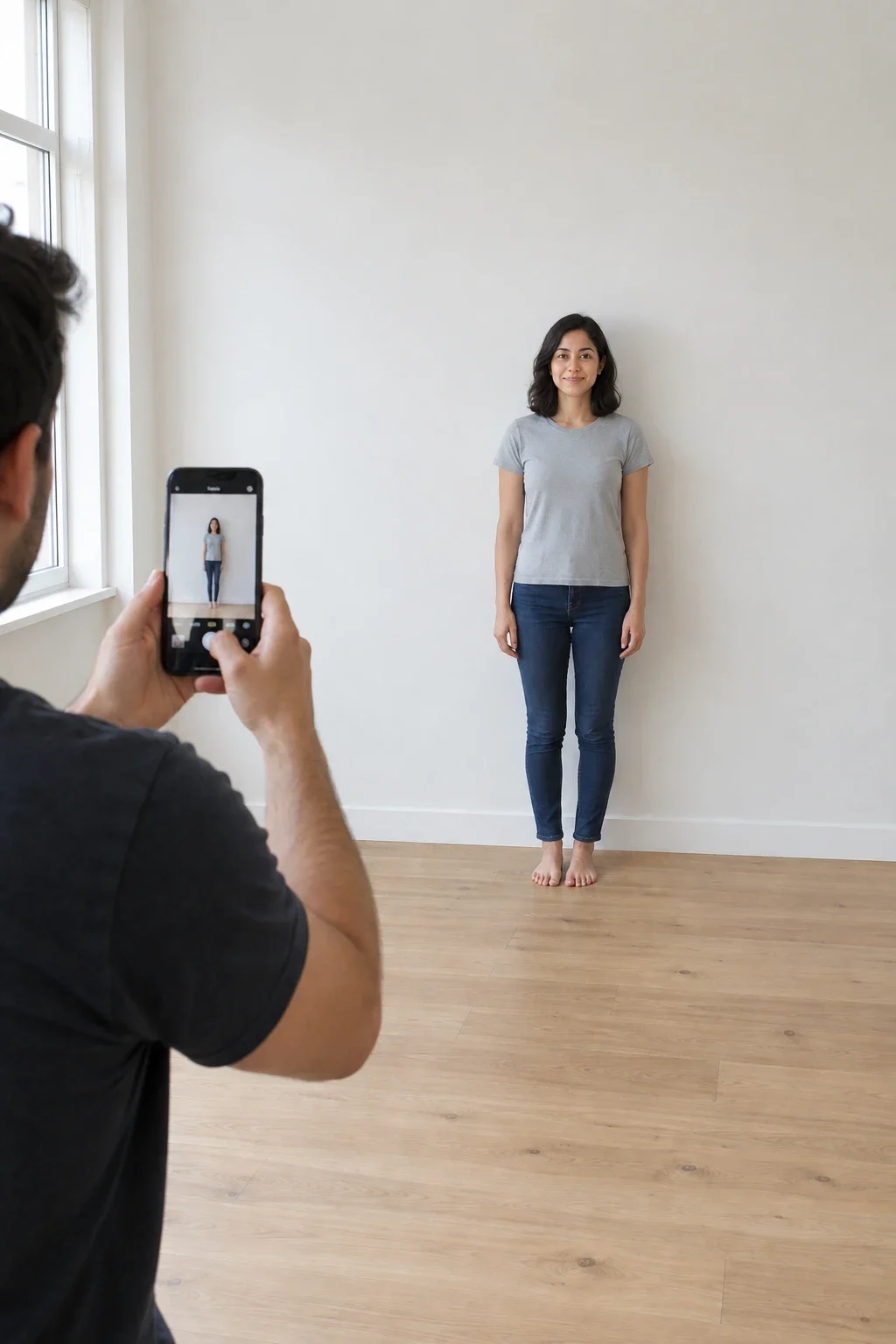
How tall am I? Measure your height with your phone.
A free online height checker. No tape measure, nothing to print. Point your phone at the feet, then the top of the head - the height appears live. Then see which celebrities you're taller than.
Percentiles are approximate: they assume a normal distribution around published national averages (CDC NHANES 2015-2018 for the US; NCD-RisC 2019 for India and the world).
Wondering how to check your height at home without a tape measure? You just need your phone.
📡 Your phone knows where it is
Unlike AI height checkers that guess from a photo, this measures real distances. As you move the phone, its camera and motion sensors build a 3-D map of the room in real metres - the same idea as Apple's Measure app and Google's ARCore, running inside your browser.
👣 Floor first, then head
Tapping at the feet pins a point on the floor. When you aim at the head, the page finds where your line of sight crosses an upright plane through that point - its height above the floor is the answer.
🙌 Nothing to hold or print
No tape measure, paper or props. Just stand straight with shoes off and aim at the very top of the head - flatten a big hairstyle for the most accurate number.
📱 iPhone and Android
On Android, Chrome uses Google's ARCore. On iPhone, where Safari has no built-in web AR, we use the 8th Wall engine by Niantic Spatial to track the phone. Both run on your device.
How accurate is it?
Live AR · Android (ARCore)±2-3 cm
Live AR · iPhone (Safari)Beta
Hold the phone at chest height and stand 2-3 m away. Two nurses measuring the same person usually differ by 3-5 mm - and everyone is 1-2 cm taller in the morning than at night.
Check my height: how this online height checker works
"How tall am I?" sounds like an easy question until you try to answer it alone at home. A tape measure bends, a ruler is too short, and it's hard to see the top of your own head in a mirror. CheckMyHeight is a free online height checker that uses the phone you already have instead. Open the page, tap Measure my height, and the camera measures from the floor to the top of your head in about 30 seconds - no app to install, no sign-up, nothing to print.
It works because modern phones know where they are in space: the camera and motion sensors build a small 3-D map of the room in real metres - the technology behind Apple's Measure app and Google's ARCore, running in the browser. The number you see is a real measurement, not a guess from a photo.
How to check your height at home, step by step
How can I check my height at home without special equipment? Follow these steps:
Take off your shoes and stand on a hard, flat floor with your heels together and your back straight. Look straight ahead, not up.
Flatten your hair. A bun, a ponytail on top or thick curls can add a centimetre or more.
Ask someone to hold the phone at about chest height, 2-3 metres away, and open this page in Safari (iPhone) or Chrome (Android).
Tap Measure my height and slowly move the phone from side to side for a few seconds, so it can map the floor.
Aim the dot at the floor between your feet and tap +. Then aim at the very top of your head - not your forehead - and tap + again.
Measure two or three times and use the middle result.
Prefer a tape measure? Our step-by-step guide on how to measure your height covers the wall-and-tape method too.
How to check my height without a measuring tape
How do I check my height without a measuring tape? You don't need one - no wall chart and nothing to hold on your head. The phone is the measuring tool, which is handy when you've just moved house, you're travelling, or the tape measure has vanished.
Tip: the floor needs a little texture for the phone to lock on. Wooden boards, tiles and carpet work well; a shiny, plain floor in dim light is the hardest case. Turn a light on if the camera struggles.
How do I check my height by myself?
Live AR needs someone to point the phone at you, because you can't aim at the top of your own head. If you're alone, stand with your back against a wall, lay your hand flat on your head, and put a sticky note on the wall just under your hand. Step away and measure the note with the camera: aim at the floor directly below it, then at the note.
A height checker for iPhone and Android - no app
Most "height checker apps" ask you to download something, create an account or watch ads. This is a height checker online instead - it runs in your phone's browser. On Android, Chrome uses Google's ARCore through WebXR. On a laptop, you'll see a QR code that opens the same page on your phone - or just type your height. The camera feed is processed on your phone and never uploaded.
How to check my height with my iPhone
Open checkmyheight.com in Safari, tap Measure my height, and allow camera and motion access. Safari has no built-in web AR, so the page loads the 8th Wall tracking engine the first time (about 6 MB). Recent iPhones should handle it well - as a height checker, iPhone 12 and newer models are the target - but the iPhone engine is still in beta, so measure twice.
Height checker comparison: phone camera vs tape measure vs photo apps
Method
Typical accuracy
Needs
Doctor's stadiometer
Within a few millimetres
A visit to a clinic, pharmacy or gym
Tape measure + wall mark
About 1 cm, if done carefully
A tape, a pencil and a helper
This phone camera (live AR)
About 2-3 cm on Android; iPhone in beta
A phone and a helper
Photo height checker apps
Often off by several cm or more
One photo - but it's a guess
Height checker from photo apps: can they measure me?
Not reliably. A photo height checker - including most "height checker AI" apps - has no real scale in the picture, so it guesses from body proportions. Camera angle, lens distortion and distance can move that guess by several centimetres. Live AR measures real distances in the room instead, which is why CheckMyHeight doesn't offer a height checker photo upload for measuring. (You can still add photos to the comparison chart and enter the height yourself.)
Why we built this height checker
Before building CheckMyHeight, I tested a lot of height and sizing websites to see what people actually need from them and what just gets in the way. For height, the gap was clear. Measuring yourself at home is awkward without a helper, a flat wall and a tape that stays level, and most "height checker" apps either ask you to install something and sign up, or estimate your height from a single photo. A photo has no real scale in it, so that estimate depends on the camera angle, the lens and the distance.
Phones can already measure real distances in a room: that is what AR measuring apps do. We wanted the same thing inside a web page, so anyone can open a link, measure, get a number with an honest error range, and see what it means next to published averages.
What this height checker measures
It measures one thing: the vertical distance from the floor to the top of a head, in real centimetres.
The floor: when you tap + at the feet, the phone's AR tracking finds the floor and pins a point on it. On Android, Chrome does this with Google's ARCore through WebXR; on iPhone, the page loads the 8th Wall engine, which is still in beta.
The head: when you aim at the top of the head, the page finds where your line of sight crosses an upright plane through that floor point. The height of that crossing above the floor is the result.
Your result: the percentile assumes a normal distribution around published averages (CDC NHANES 2015-2018 for US adults, NCD-RisC 2019 for India and the world), and the healthy weight range is a BMI of 18.5 to 24.9 at your height.
Sources last checked on 24 October 2026. It does not measure from photos, it cannot measure you without someone holding the phone, it does not weigh you, and it is not a medical stadiometer. The camera feed is processed on the phone and never uploaded; only your height and gender choice are kept, in this browser, so the comparison chart remembers you.
Why this height checker is different
It measures instead of guessing. The number comes from real distances in the room, not from body proportions in a photo; the comparison table above shows how that stacks up against a tape and a stadiometer.
No app, no account. It runs in Safari or Chrome, and on a laptop a QR code hands the page to your phone.
The error range is printed: about 2-3 cm on Android, with the iPhone engine marked as beta.
The method and the sources are on the page, including how the percentile is worked out.
Private by design: nothing from the camera leaves your phone.
In 11 languages, each with the local average heights for its countries.
How accurate is measuring your height with a phone?
On Android with ARCore, a careful measurement is usually within 2-3 cm. What matters most:
Distance: stand 2-3 metres away so the whole body fits in view.
Time of day: you're about a centimetre taller in the morning, because the discs in your spine compress during the day.
Two nurses measuring the same person with a stadiometer usually differ by 3-5 mm. A phone won't beat that, but it's far better than guessing - and it's always in your pocket.
Where can I check my height for free?
Right here, at home. For a clinical measurement too, a doctor's office, school nurse, many pharmacies and some gyms have a wall-mounted stadiometer. If the two numbers agree within a couple of centimetres, you can trust your phone next time.
Where can I check my height and weight near me?
If you're searching for where to check my height near me, start with local pharmacies and health centres: many have a stadiometer and scales, and some have self-service health kiosks that measure height and weight together. Where can I go to check my height if none of those are close? Your phone, right now - then use the BMI calculator for the weight side.
Open this page on your phone and tap Measure my height. Someone points the camera at your feet, then at the top of your head, and your height appears live. That's how to measure my height (or yours) without a wall chart or tape.
Can I check my height with my phone?
Yes. Open this page on your phone, tap Measure my height and point the camera at the person - first at the floor between their feet, then at the top of their head. It works in Safari on iPhone and Chrome on Android, with no app to install.
How do I check my height without a measuring tape?
Use your phone. Live AR measures from the floor to the top of your head, so you need no tape measure, ruler or anything else - just your phone and someone to hold it. Stand straight with shoes off, and flatten a big hairstyle for the most accurate number.
How do I check my height by myself?
Live AR needs someone to point the phone at you. On your own, stand with your back against a wall, lay your hand flat on your head and put a sticky note on the wall under it. Step away and measure the note with live AR - aim at the floor below it, then at the note.
Can I check my height with my iPhone?
Yes - it works as an iPhone height checker in Safari, including older models like the iPhone 12. Safari has no built-in web AR, so on iPhone we load the 8th Wall tracking engine (about 6 MB the first time). Allow camera and motion access when asked, then move the phone slowly for a few seconds before you start.
Where can I check my height for free?
Right here, at home. This height checker is free and runs in your phone's browser - no app, no sign-up. A doctor's office or pharmacy with a wall-mounted stadiometer is the other free option if you want a clinical measurement.
Can I check my height online?
Yes. The whole thing runs online in your browser: measure with the camera on a phone, or type your height on any device to see your percentile and celebrity matches.
Do I need a height checker app?
No. There's nothing to download - the online height checker works straight from this page.
Is my camera video uploaded?
No. The camera feed is processed on your phone to track its position and is never sent to our servers.
How do I check my real height?
Measure barefoot on a hard floor, heels together, looking straight ahead, and aim at the very top of your head - not your hair. Do it in the morning, when you're at your tallest, and take the middle of two or three measurements. That's your real height; the number on an old ID card is often a guess.
How do I check my height on my phone?
Open this page on your phone, tap Measure my height, and allow camera access. Someone points the phone at your feet and taps +, then at the top of your head and taps + again. The height appears live, in feet and inches and in centimetres.
How do I check my height and weight?
Measure your height with the phone camera here, then weigh yourself in the morning in light clothes. Put both into the BMI calculator to see your BMI and the healthy weight range for your height.
Where can I check my weight and height near me?
Most pharmacies, doctors' surgeries, health centres and many gyms can measure height and weight together, often for free, and some pharmacies have self-service health kiosks. Or check your height right now with your phone and your weight on any bathroom scale.
Can an AI height checker measure my height from an image?
Only roughly. An AI height checker that works from a single image has no real scale, so it guesses from body proportions and can be off by several centimetres. CheckMyHeight measures live with your phone's AR camera instead, which uses real distances in the room.
Does the height checker show my height in feet?
Yes. Every result shows feet and inches (like 5′ 9½″) and centimetres (like 176.5 cm) together, so you never need to convert.
Can I use this height checker in India?
Yes. It works on any phone in any country, shows your height in both feet and cm, and your result compares you with Indian averages as well as US and world averages.
Can a height checker tell me if my height is normal for my age?
For adults, yes: your result shows your percentile - how many adults of your sex you're taller than. For children, height is judged against growth charts for their exact age, which a paediatrician does; to predict a child's adult height, use the height calculator.
What is the most accurate height measurement at home?
A careful tape-measure mark on a wall is usually within about 1 cm. Measuring with your phone's AR camera is usually within 2-3 cm on Android and needs no tools. Either way, measure barefoot in the morning and repeat it a couple of times.
Starting the camera…
Allow camera access if your phone asks.
Taking a while? Turn on more light and aim at a floor with some pattern. Plain, shiny floors are hard to find.